

Nowadays people search for information like what the weather is like, how much a ticket costs, and how to get from A to B. They usually open a weather app to check the situation at the destination, then a bus or train app to check prices, and open the browser or another app to search for places around.
This is possible because backend servers expose APIs. Technically it’s an endpoint designed around conventions that let humans, and the code humans write, understand and build logic around it. These APIs are available via HTTP, which is why you can reach them from a browser or an app. The specific term server-side developers use for this is REST, and its endpoints are called REST endpoints.
The problem with REST is that it was built for developers, not for models. A REST API doesn’t describe itself at runtime, so you can’t ask it “what can you do?” and get a useful answer back. Instead, a person reads an OpenAPI spec or the docs once, decides which of the often dozens of endpoints are relevant, and hardcodes the calls with the right parameters, order, and auth.
An LLM has none of that groundwork done for it. Point it at a REST API directly and it either needs the whole spec stuffed into its context window, burning tokens reasoning over hundreds of fields it will never touch, or someone has to write a custom adapter for every single API it might call. Neither scales: five APIs means five integrations, and each one breaks the moment the underlying API changes.
What is the Model Context Protocol (MCP)?
This is where MCP comes in. MCP is an open-source standard for connecting AI applications to external systems. Using MCP, AI applications like Claude or Codex can connect to databases, search engines, or specialized prompts, enabling them to access key information and perform tasks.
MCP follows a client-server architecture, but it isn’t strictly one-directional. An MCP host is an AI application like Claude Desktop or Codex App that manages one or more MCP clients, and each client holds a dedicated connection to a single MCP server. Connect to three servers and the host creates three clients, one per server. The client consumes what the server offers, but the server can also make requests back to the client — which is what enables features like sampling, where the server borrows the client’s LLM. The server is simply a program that provides context, whether it runs locally on your machine or remotely on a hosted platform.
MCP Server
MCP servers are programs that expose specific capabilities to AI applications through standardized protocol interfaces. A server provides that functionality through tools, resources, and prompts. Tools are functions the model can call to take action, resources are read-only data the application can pull into context, and prompts are reusable templates the user can invoke. This post focuses on MCP tools, the one you’ll reach for first and use most.
MCP Tools
Much like mobile apps use APIs, LLMs use tools. A MCP tool is a function the model can call directly when it determines that doing so would help answer a user’s request. These tools can perform actions such as writing to databases, calling external APIs, or any other custom logic.
Tools are model-controlled, which means the AI can discover and invoke them on its own. At the same time, MCP is designed with human oversight in mind. To support trust and safety, applications can give users control in several ways, including:
- Choosing which tools are available to the model
- Requiring approval before specific tool calls run
- Setting permissions to pre-approve low-risk actions
- Providing activity logs that show tool executions and their results
This oversight matters because a tool is arbitrary code execution. You shouldn’t trust a tool’s own description of what it does unless it comes from a server you trust, which is why the user should be able to approve any tool before it runs.
In Spring, a tool looks a lot like a controller. Same service call underneath, different entry point:
@GetMapping("/current")
public ResponseEntity<ShoppingCart> find() {
    var shoppingCart = shoppingCartService.find();
    return ResponseEntity.ok(shoppingCart);
}@McpTool(description = "Retrieve shopping cart")
public ShoppingCartList retrieveShoppingCartItems() {
var shoppingCart = shoppingCartService.find();
return new ShoppingCartList(shoppingCart);
}The Streamable Shopping Cart Tool
In this post I will take one of our previous examples and transform it from a service providing REST endpoints into a Streamable HTTP MCP server that will expose tools. An AI agent can access our shopping cart, acting as a more personalized assistant.
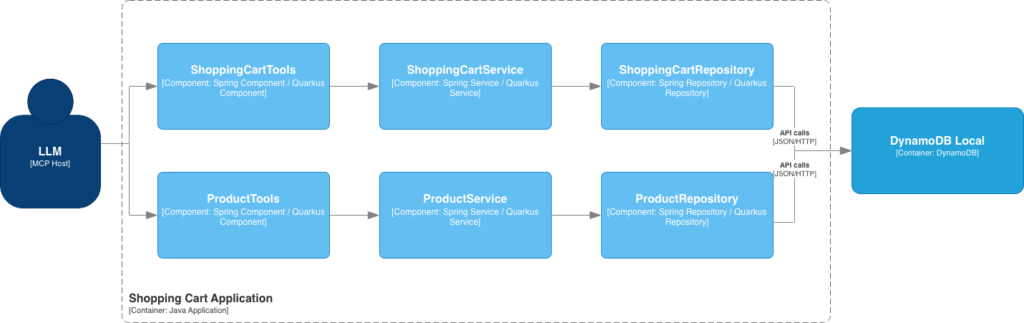
We will add a Product schema to the existing DynamoDB database, leveraging the single-table design and storing two different entity types in one table rather than splitting them across separate tables.
Products live under the PRODUCT partition key, with the product id as the sort key. Querying the whole catalog is then as simple as passing PRODUCT to a query. Each user’s cart lives under its own SHOPPING_CART#{userId} partition, where each item is a row keyed by the product id it references.
| Primary Keys | Attributes | |||
|---|---|---|---|---|
| PK | SK (product id) | Name | Price | Description |
| PRODUCT | 1 | Coffee Mug | 12.99 | Ceramic mug |
| 2 | Notebook | 8.50 | A5 notebook | |
| 3 | Desk Lamp | 34.00 | LED desk lamp | |
| SHOPPING_CART#1 | 1 | Coffee Mug | 12.99 | |
| 3 | Desk Lamp | 34.00 | ||
For running the project use:
- JDK 25
- Maven 3.9
- IDE of your choice
- Docker and Docker Compose
Setup
The same dependencies were used as in this example. We have however extended them with the MCP server.
The key MCP dependencies for Spring start with the AI Bill of Materials (BOM), which manages the versions of all AI-related artifacts so they stay aligned. With the BOM in place, you add the spring-ai-starter-mcp-server-webmvc dependency, which provides the MCP server over Streamable HTTP. You can find the full dependency list in the GitHub repo.
<dependencyManagement>
    <dependencies>
        <dependency>
            <groupId>org.springframework.ai</groupId>
            <artifactId>spring-ai-bom</artifactId>
            <version>1.1.7</version>
            <type>pom</type>
            <scope>import</scope>
          </dependency>
    </dependencies>
</dependencyManagement>

<dependency>
    <groupId>org.springframework.ai</groupId>
    <artifactId>spring-ai-starter-mcp-server-webmvc</artifactId>
</dependency>The key MCP dependencies for Quarkus start with the MCP server Bill of Materials (BOM), which manages the versions of all MCP-related artifacts so they stay aligned. With the BOM in place, you add two dependencies: quarkus-mcp-server-http, which provides the MCP server over Streamable HTTP, and quarkus-mcp-server-test, which supports testing that server. You can find the full dependency list in the GitHub repo.
<dependencyManagement>
    <dependencies>
        <dependency>
            <groupId>io.quarkus.platform</groupId>
            <artifactId>quarkus-mcp-server-bom</artifactId>
            <version>3.34.5</version>
            <type>pom</type>
            <scope>import</scope>
        </dependency>
    </dependencies>
</dependencyManagement>

<dependency>
    <groupId>io.quarkiverse.mcp</groupId>
    <artifactId>quarkus-mcp-server-http</artifactId>
</dependency>

<dependency>
    <groupId>io.quarkiverse.mcp</groupId>
    <artifactId>quarkus-mcp-server-test</artifactId>
    <scope>test</scope>
</dependency>You’ll need to set some basic configuration for both DynamoDB and MCP so the example runs successfully — the DynamoDB setup is the same as in the previous post.
The MCP server is running on the same port as the service. You need to specify the protocol, which in our case is STREAMABLE and the endpoint /mcp where the MCP server is reachable.
spring:
  ai:
    mcp:
      server:
        protocol: STREAMABLE
        name: shopping-cart
        annotation-scanner:
          enabled: true
        streamable-http:
          mcp-endpoint: /mcp

  docker:
    compose:
      enabled: false

shopping-cart:
table-name: shopping-cart@Bean
public CorsFilter corsFilter() {
var config = new CorsConfiguration();
config.setAllowedOrigins(List.of("*"));
config.setAllowedMethods(List.of("GET", "POST", "OPTIONS", "DELETE"));
config.setAllowedHeaders(List.of("*"));
config.setExposedHeaders(List.of("Mcp-Session-Id"));
var source = new UrlBasedCorsConfigurationSource();
source.registerCorsConfiguration("/mcp/**", config);
return new CorsFilter(source);
}CORS configuration is needed when a browser-based client like MCP Inspector is used.
The nice part is that Quarkus autoconfigures the MCP server for you based on the dependency: just by adding quarkus-mcp-server-http, you get the streamable endpoint at http://localhost:8080/mcp and the SSE endpoint at http://localhost:8080/mcp/sse for older clients out of the box. Full configuration available on my GitHub.
quarkus:
  http:
    cors:
      enabled: true
      origins: "/.*/"
      methods: GET,POST,OPTIONS
      headers: "*"
  devservices:
    enabled: true
  dynamodb:
    endpoint-override: http://localhost:8000
    aws:
      region: eu-central-1
      credentials:
        type: static
        static-provider:
          access-key-id: test
secret-access-key: testSubscribe to my newsletter
First Tool
Everything so far has been setup. Here’s the part that matters — turning a Java method into something an AI can call:
private final ShoppingCartService shoppingCartService;

@McpTool(
    description = "Retrieve shopping cart",
    generateOutputSchema = true,
		annotations = @McpAnnotations(
		    readOnlyHint = true,
		    idempotentHint = true,
		    destructiveHint = false,
		    openWorldHint = false))
public ShoppingCartList retrieveShoppingCartItems() {
		return new ShoppingCartList(shoppingCartService.find());
}@Inject
private ShoppingCartService shoppingCartService;
@Tool(
description = "Retrieve shopping cart",
structuredContent = true,
annotations = @Annotations(
title = "Retrieve shopping cart",
readOnlyHint = true,
destructiveHint = false,
idempotentHint = false
openWorldHint = false))
public ShoppingCartList retrieveShoppingCartItems() {
return new ShoppingCartList(shoppingCartService.find());
}That’s it. That’s an MCP tool.
@McpTool/@Tool on a method in a bean is the whole contract. Spring and Quarkus scan for it at build time and register it with the MCP server on /mcp. There’s no controller, no route, no manual JSON-RPC handling. The description isn’t just a comment, it’s shipped to the AI client as part of the tool’s schema, and it’s how the model decides when to call this tool. Write it for the model, not for yourself: “Retrieve shopping cart” is a prompt, not documentation.
The method name retrieveShoppingCartItems becomes the tool name, and the return type becomes the tool’s output. structuredContent/generateOutputSchema tells the MCP server to return the result as structured JSON data rather than plain text. When enabled, the tool’s return object is serialized into a machine-readable format the AI can parse reliably, instead of a formatted text blob.
This matters when the model needs to work with the actual fields, like prices, product IDs, quantities, rather than just reading a summary. Setting it to true is what generates the outputSchema you see below. Without it, the tool would still return data, but the client wouldn’t get a machine-readable description of the shape of that data. In MCP Inspector it produces the following schema:
{
  "tools": [
    {
      "name": "retrieveShoppingCartItems",
      "description": "Retrieve shopping cart",
      "inputSchema": {
        "type": "object",
        "properties": {},
        "required": []
      },
      "outputSchema": {
        "type": "object",
        "properties": {
          "shoppingCartItems": {
            "type": "array",
            "items": {
              "type": "object",
              "properties": {
                "name": {
                  "type": "string"
                },
                "productId": {
                  "type": "string"
                },
                "unitPrice": {
                  "type": "number"
                }
              }
            }
          }
        }
      },
      "annotations": {
        "title": "Retrieve shopping cart",
        "readOnlyHint": true,
        "destructiveHint": false,
        "idempotentHint": true,
        "openWorldHint": false
      }
    }
  ]
}annotations is a group of hints that describe how the tool behaves, so the client and model can make smarter, safer decisions about calling it. They’re advisory metadata, not enforcement, and the tool still does whatever its code does.
readOnlyHint signals that the tool only reads data and doesn’t modify anything. For retrieveShoppingCartItems, this is accurate as it fetches the cart, and changes nothing. Clients can use this to skip approval prompts for safe, read-only operations, since there’s no risk of side effects.
idempotentHint signals that calling the tool repeatedly with the same input has no additional effect beyond the first call. For retrieveShoppingCartItems, this is true. Reading the cart never changes anything, so calling it once or ten times leaves the system in exactly the same state and returns the same result. A client can use this to safely retry the call after a network hiccup or timeout, without worrying that a second call might cause something unexpected.
destructiveHint signals that the tool doesn’t delete or irreversibly change data. It’s the counterpart to readonly. A tool that removes items from the cart would set this to true so the client knows to be more cautious. Here it’s false because retrieving a cart destroys nothing.
openWorldHint signals that the tool operates on a closed, known domain rather than reaching out to the open internet or an unbounded external system. This tool reads from DynamoDB. A tool that searched the web or called an arbitrary third-party API would set this to true, telling the client the tool’s effects extend beyond your controlled system.
Destructive Tool
So far the tool only reads. But tools get interesting when they modify state, and that’s where the annotations stop being descriptive and start guiding.
private final ShoppingCartService shoppingCartService;

@McpTool(
    description = "Remove product from shopping cart",
    generateOutputSchema = true,
    annotations = @McpAnnotations(
        idempotentHint = true,
        openWorldHint = false))
public ShoppingCartList removeProduct(@McpToolParam(description = "ID of the product") String productId) {
		return new ShoppingCartList(shoppingCartService.removeProduct(productId));
}@Inject
private ShoppingCartService shoppingCartService;
@Tool(
description = "Remove product from shopping cart",
structuredContent = true,
annotations = @Annotations(
title = "Remove product from shopping cart",
idempotentHint = true,
openWorldHint = false))
public ShoppingCartList removeProduct(@ToolArg(description = "ID of the product") String productId) {
return new ShoppingCartList(shoppingCartService.removeProduct(productId));
}The @McpToolParam and @ToolArg annotations mark a method parameter as something the model needs to supply, and just like the tool description, the annotation description is shipped to the client as part of the schema. “ID of the product” tells the model what value belongs there. Write it clearly, because the model relies on it to figure out what to pass when it decides to call the tool.
This tool defaults to destructiveHint = true. The client is warned that the call removes data, which is the kind of action a client might want to ask the user.
The return type needs a decision, and Quarkus forces the issue with an error, as a tool can’t return void. For REST, a delete returns 204 No Content. MCP has no equivalent. Tools are expected to return content, and the protocol doesn’t define an empty success response the way HTTP does. Returning the updated state seems like a good idea, as the model gets to see the result of its action, so it can confirm the removal worked and continue with accurate context, without a second call just to check what changed.
Tool Testing
Let’s write an integration test that exercises the full path automatically: an MCP call over the protocol, through the tool, down to DynamoDB and back. Following tests demonstrate the retrieve tool, add product tool and error handling:
import io.modelcontextprotocol.client.McpClient;
import io.modelcontextprotocol.client.McpSyncClient;

@LocalServerPort
int port;

@Autowired
JsonMapper jsonMapper;

McpSyncClient testClient;

@BeforeEach
void beforeEach() {
		var transport = HttpClientStreamableHttpTransport
          .builder("http://localhost:" + port)
          .endpoint("/mcp")
          .build();

		testClient = McpClient.sync(transport).build();
		testClient.initialize();

		dynamoDbTemplate.scanAll(Product.class).items().forEach(dynamoDbTemplate::delete);
		dynamoDbTemplate.scanAll(ShoppingCartItem.class).items().forEach(dynamoDbTemplate::delete);
}

@AfterEach
void afterEach() {
		testClient.closeGracefully();
}

@Test
void retrieveShoppingCartItemsReturnsSavedItemTest() {
		mockItem();
		var response = testClient.callTool(new CallToolRequest("retrieveShoppingCartItems", Map.of()));
		var data = jsonMapper.valueToTree(response.structuredContent());
		var items = data.get("shoppingCartItems");
		assertEquals(1, items.size());

		var item = items.get(0);
		assertEquals("1", item.get("productId").stringValue());
		assertEquals("Test", item.get("name").stringValue());
		assertEquals(new BigDecimal("2499").toString(), item.get("unitPrice").asString());
}

@Test
void removeProductTest() {
		mockItem();
		var response = testClient.callTool(new CallToolRequest("removeProduct", Map.of("productId", "1")));
		var data = jsonMapper.valueToTree(response.structuredContent());
		assertTrue(data.get("shoppingCartItems").isEmpty());
}

@Test
void removeProductThrowsExceptionWhenProductNotInShoppingCartTest() {
		var response = testClient.callTool(new CallToolRequest("removeProduct", Map.of("productId", "1")));
		var textContent = (TextContent) response.content().getFirst();
		assertTrue(response.isError());
		assertEquals("Product 1 is not in the shopping cart", textContent.text());
}
import io.quarkiverse.mcp.server.test.McpAssured;
import io.vertx.core.json.JsonObject;
McpAssured.McpStreamableTestClient testClient;
@BeforeEach
void beforeEach() {
testClient = McpAssured.newConnectedStreamableClient();
productTable.createTable();
}
@AfterEach
void afterEach() {
testClient.disconnect();
productTable.deleteTable();
}
@Test
void retrieveShoppingCartItemsReturnsSavedItemTest() {
var expected = mockItem();
testClient
.when()
.toolsCall("retrieveShoppingCartItems", toolResponse -> {
var response = (JsonObject) toolResponse.structuredContent();
var items = response.getJsonArray("shoppingCartItems");
assertEquals(1, items.size());
var item = items.getJsonObject(0);
assertEquals(expected.getSk(), item.getString("productId"));
assertEquals(expected.getName(), item.getString("name"));
assertEquals(expected.getUnitPrice().toString(), item.getString("unitPrice"));
})
.thenAssertResults();
}
@Test
void removeProductTest() {
mockItem();
testClient
.when()
.toolsCall("removeProduct", Map.of("productId", "1"), toolResponse -> {
assertFalse(toolResponse.isError());
var response = (JsonObject) toolResponse.structuredContent();
var items = response.getJsonArray("shoppingCartItems");
assertTrue(items.isEmpty());
})
.thenAssertResults();
}
@Test
void removeProductThrowsExceptionWhenProductNotInShoppingCartTest() {
testClient
.when()
.toolsCall("removeProduct", Map.of("productId", "1"), toolResponse -> {
assertTrue(toolResponse.isError());
var errorText = toolResponse.firstContent().asText().text();
assertTrue(errorText.contains("Product 1 is not in the shopping cart"));
})
.thenAssertResults();
}Both projects test the server the same way: connect a client over the real MCP protocol, call a tool, and evaluate the response. The client differs by framework: Quarkus provides McpAssured, its built-in MCP test client, while Spring assembles an McpSyncClient from the MCP Java SDK. In both, we initialize the client before each test and close it afterward, and we reset the DynamoDB tables so every test starts from a clean state.
Each test then calls a tool and inspects its structured content as JSON. We read the shoppingCartItems from that response and assert on the individual fields. For the error case, the failure comes back inside the tool response rather than as an HTTP status, so we check the error flag and read the message from the response content.
The tests above are trimmed to the parts that matter for the walkthrough — the client setup, the tool calls, and the assertions. The complete classes include the imports, the class declaration, and the DynamoDB setup. You can find the full, runnable versions for both frameworks on GitHub:
- Spring: ShoppingCartToolsTest.java
- Quarkus: ShoppingCartToolsTest.java
The tests prove the server works. But the real point is what happens when an actual model connects to it. These are real conversations across a few different clients: asking what’s in the cart, removing an item, adding a new one. No special commands, just plain requests the model turns into tool calls.
Adding your MCP server to Codex is easy. It may be able to pick it up automatically if local discovery is enabled. If not, go to Codex -> Settings -> MCP servers -> Add server
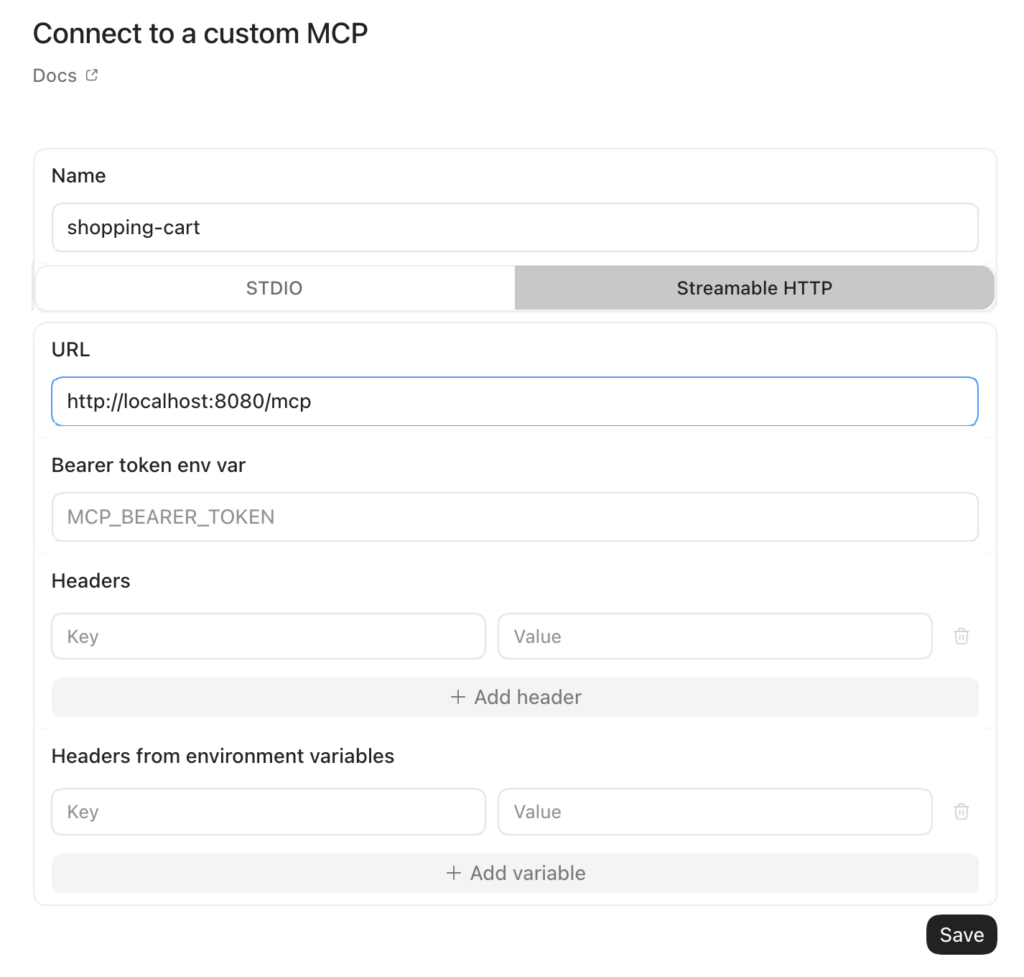
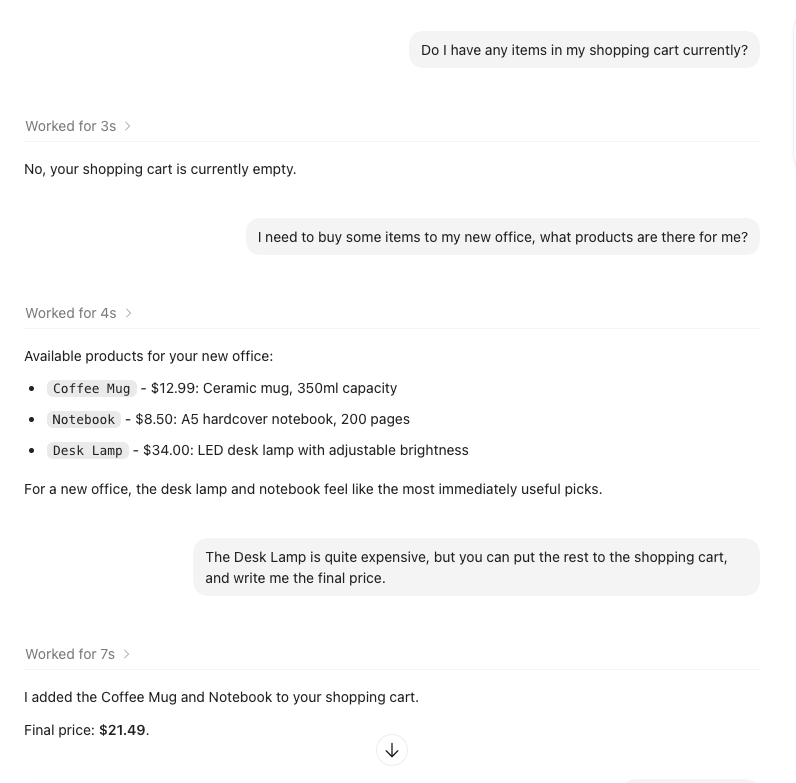

Adding an MCP server to Claude Desktop is a little less straightforward, because it won’t accept a plain HTTP server — the endpoint has to be HTTPS. To get around that for local development, we’ll expose the server through Cloudflare Tunnel:
cloudflared tunnel --url http://localhost:8080

INF Requesting new quick Tunnel on trycloudflare.com...
INF +--------------------------------------+
INF |  Your quick Tunnel has been created! |
INF |  https://example.trycloudflare.com   |
INF +--------------------------------------+To add the MCP server go to Claude Desktop -> Customize -> Connectors -> ➕ ->Add custom connector
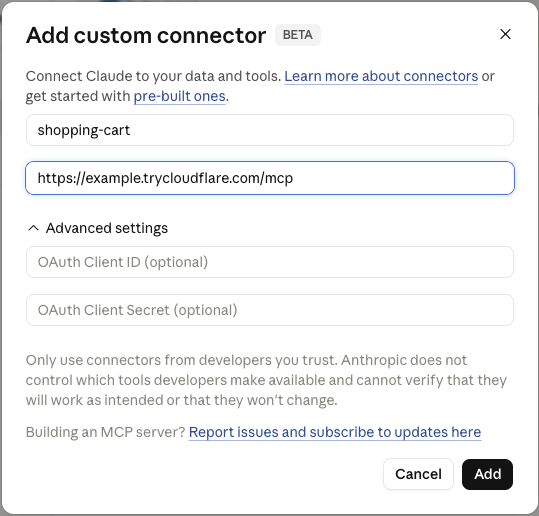
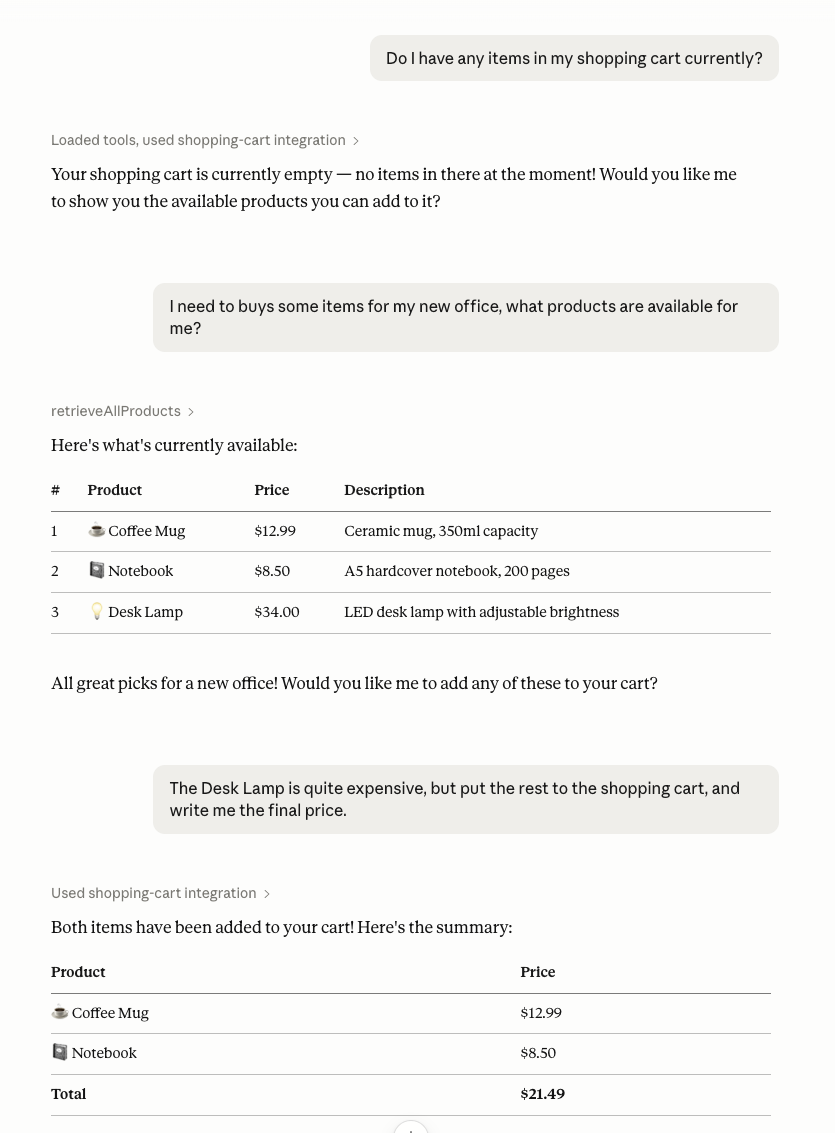
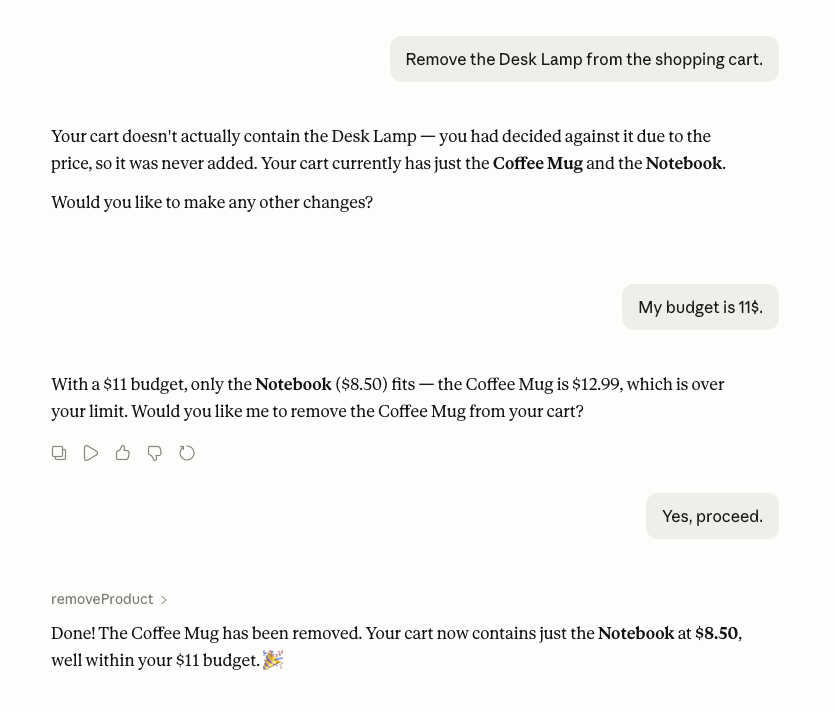
To add your MCP server to Codex CLI execute the following command:
codex mcp add shopping-cart --url http://localhost:8080/mcp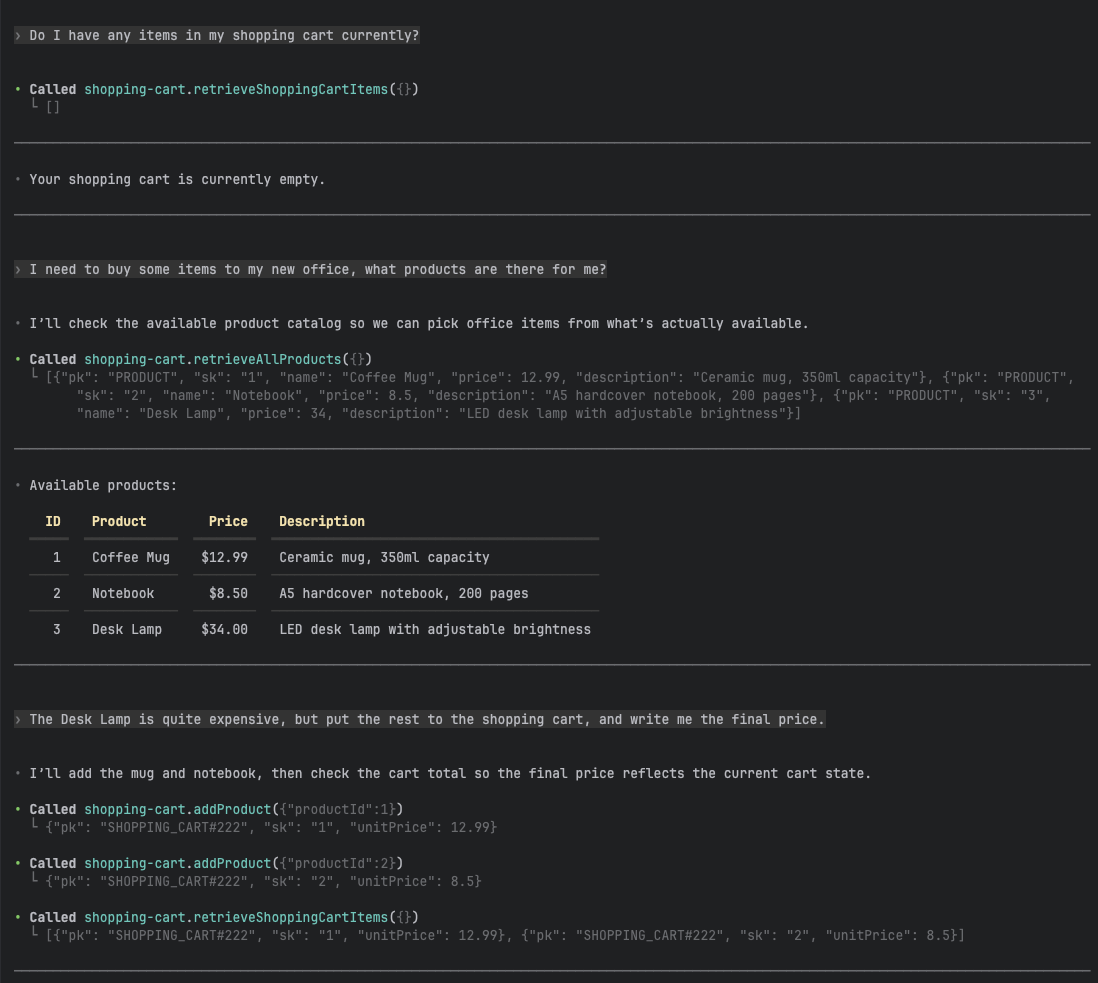
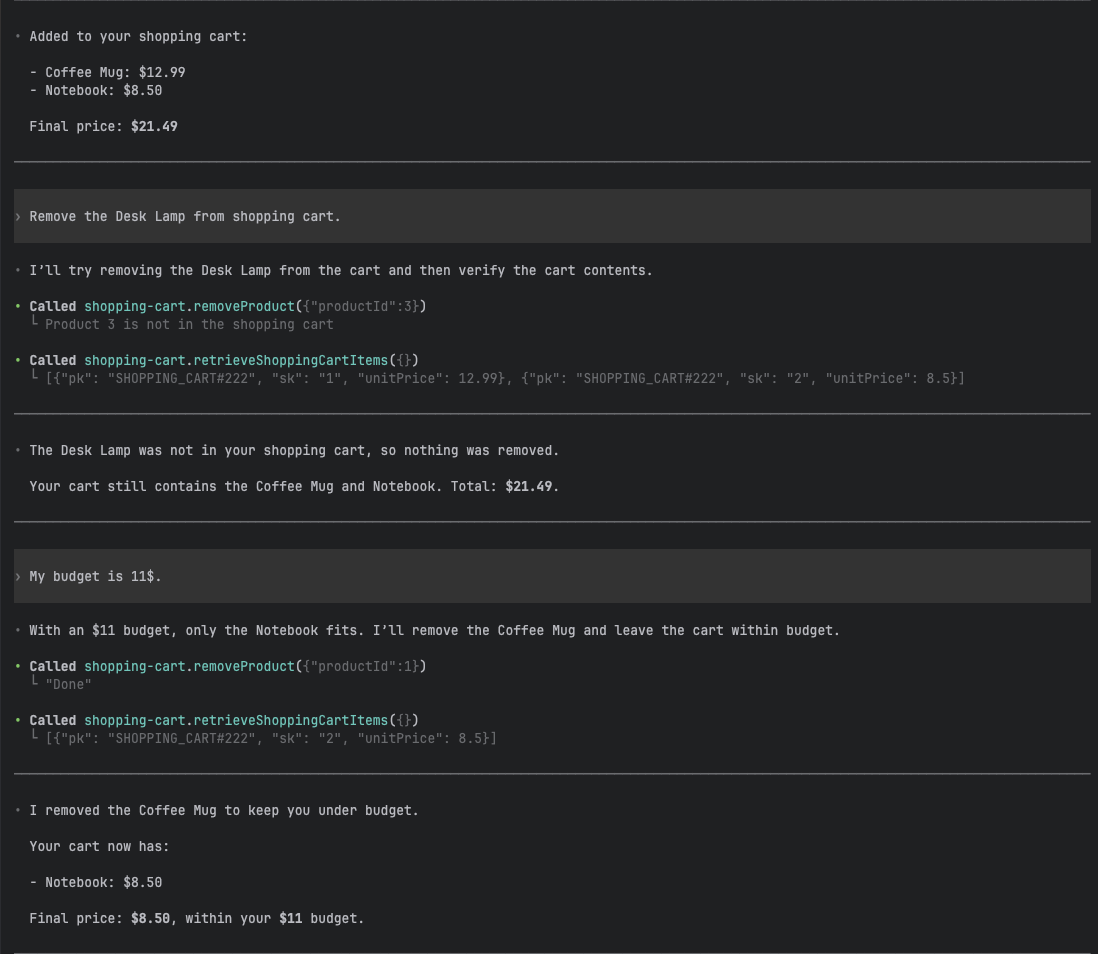
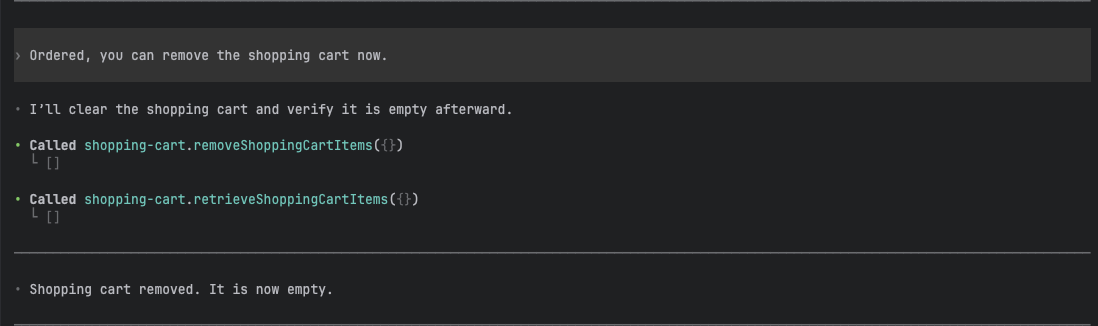
To add your MCP server to Claude Code execute the following command:
claude mcp add --transport http shopping-cart http://localhost:8080/mcp
Conclusion
In this post we rewrote a REST shopping cart service into a Streamable HTTP MCP server, learning how tools, structured content, and annotations work along the way. We extended the example with a product catalog using single-table design, added tools to read and modify the cart, tested them properly, and connected the server to real clients. The logic barely changed. What changed is who the interface is for.
That last point is worth sitting with. For decades, exposing a capability to a user meant building a screen for it: a form, a button, a list, a flow to click through. The interface was the product. But a tool like our shopping cart needs none of that. It describes itself, and a model calls it. No screen, no form, no flow — just a capability and a model that knows how to use it.
It’s not hard to imagine where this goes. If the model is the one operating the software, the screen stops being the point. You ask for something in plain language, lets say through a phone, through earbuds, through glasses, eventually through interfaces we haven’t built yet — and the model figures out which tools to call, calls them, and hands back an answer. The three apps you open today to check the weather, compare ticket prices, and find your way from A to B collapse into a single request. The apps still exist. You just stop looking at them.
That’s the shift MCP hints at. Not a better UI, but fewer of them. Capabilities built for models to consume, with the interface dissolving into whatever device happens to be closest. We’re a long way from that world, and plenty about it is still unclear. But the small server we built in this post is a piece of it: software with no interface, waiting for a model to pick it up.
Source code for both Spring and Quarkus is available on my GitHub.



Leave a Reply